Laptops have surely come a long way, and in the last few years the trend has been in favor of thinner and lighter laptops. This inevitably means that cooling is a big problem for modern laptops. We all have been there, you are on the verge of submitting an important assignment, the fan is spinning at full speeds, the battery is draining fast, and the laptop is frying your lap hard; this happens to the best of us, and the anxiety is real.
Well, a good laptop cooling pad is here to the rescue. Where modern laptops fail to deliver on cooling performance, some aftermarket solutions come in handy. Read on to find out more about what we think are the best laptop coolers and cooling pads you can buy as of late 2026, from forced-air pads to suction-style coolers. But before we start, let’s clear some important details:
- Only buy a laptop cooling pad if you really need it. While we do not favor any brands, many MacBook, Dell XPS, and HP Spectre models cope well with everyday workloads. Thin, fanless models like the MacBook Air can still throttle under long heavy loads, so a cooler can help there. Also, if you have a gaming laptop, you may or may not need a cooler. For example, users with Dell Alienware laptops report fewer gains compared to other brands. Therefore, we advise you to be sure whether you really need an external solution.
- Make sure the laptop cooling pad you buy supports your laptop size. Most coolers are compatible with laptops ranging between a screen size of 11 inches all the way to 17 or 19 inches. For a 17-inch laptop, check that the pad lists 17 inches or larger before you buy.
- Laptop cooling pads have started to come in different shapes and sizes recently. We have listed some of the best-performing ones. These include forced-air cooling pads, which blow cool air into the bottom of your laptop, and suction-style coolers, which pull hot air out through the vents. This will help you make the right choice between convenience, portability, and performance.
- You should definitely get a cooler if your laptop gets considerably warm to the touch since excessive heat can cause thermal throttling and, over time, wear on your laptop’s internal components. Mechanical hard drives are especially sensitive to heat.
Disclosure: This post contains affiliate links. When you purchase a service or a product through the links, I sometimes earn a commission, at no additional cost to you. Read my full disclosure here.
With that out of the way, let’s get started.
Best Laptop Cooler & Cooling Pad 2026
| Product Name | Laptop Size | No. of Fans | Prices |
| Opolar LC-06 | All Sizes | – | How much? |
| Havit Slim HV-F2056 | 15.6″-17″ | 3 | How much? |
| TECKNET Laptop Cooling Pad | 12″-17″ | 3 | How much? |
| Kootek Chill Pad Mat | 12″-17″ | 5 | How much? |
| Thermaltake Massive V20 | 10″-17″ | 1 | How much? |
| KLIM Wind Laptop Cooling Pad | 11″-19″ | 4 | How much? |
1. Opolar LC-06 – Revolutionary
Quick view on Opolar
Available in: Australia, Canada, UK and US
Quick Overview
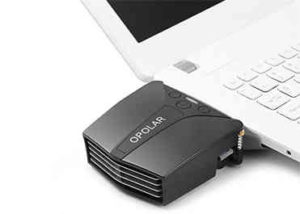
Most of the laptop cooling solutions in market take the form of a large cooling pad which uses a USB-powered fan to blow air into your laptop. The Opolar LC-06 is a suction-style laptop cooler, and it does the opposite: it pulls hot air out of your laptop. It attaches to the side vent of your device using an adhesive pad that sticks to the bottom of your device. The vents are enclosed by a silicone rubber sealing, along with arms equipped with a spring-loaded mechanism that attach to the side of your laptop. There is even a dust filter to prevent accumulated dust from your device from being inhaled by the cooler. In short, there is plenty of attention to detail on this small cooler.
The glossy black finish with silver accents is not the best design we have seen, and the build quality isn’t superb considering it’s made out of plastic, but you get what you pay for. The cooler is powered via a standard Type-A USB port. With the latest LC-06 version, Opolar has included a temperature display that reads the air temperature from the laptop vent. They also claim to have included a ‘scratch-resistant surface’ and more compatibility.
The performance on this one is great. You can operate this in automatic mode, which automatically selects the optimum speed, or use manual mode, which gives you the freedom to operate at 13 different speeds. By sucking out the hot air from your laptop’s internals, this cooler works in conjunction with your laptop’s exhaust fan and greatly aids heat dissipation.
Speaking of compatibility, this is a big problem with this cooler. Since many modern laptops, especially ultrabooks, are being manufactured with bottom vents only, this cooler is limited to a specific market segment. So then, the Opolar LC-06 is excellent for those who are looking for exceptional value and great performance in a very portable package. The only downside is that it only supports laptops with side vents or, in some cases, back vents too.
2. Havit F2056 Slim Laptop Cooling Pad – Universal
Quick view on Amazon
Available in: Australia, Canada, UK and US
Quick Overview
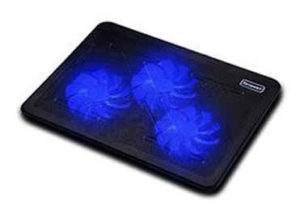
There is a reason why the Havit cooler is one of the most popular laptop cooling pads on Amazon: it is good at what it does. This cooler is universal, supporting a wide array of devices differing in screen sizes and thickness. A total of three 110mm fans are placed strategically to maximize airflow and compatibility.
The build quality is very solid on this one. Your laptop rests on a metal mesh grille which is sturdy and lightweight. The metal mesh also helps in distributing the heat evenly on the pad allowing for better thermal management. The design is very stealthy and the matte black look appeals to a wider audience of professionals, content creators, and gamers. There is one flaw that really bogs the package down, and that would be the inability to control the blue accent lighting which illuminates the fans. The lighting becomes obtrusive in dark areas or corporate workplaces.
Other highlighting features include a very lightweight construction at 1.6lbs, very thin chassis at 1 inch, and an ergonomic design. In fact, this is one of the few coolers that does not sacrifice on build quality over portability. While this is nowhere near as portable as suction-style coolers like the Opolar LC-06 get, this is as good as a decent performing cooling pad gets.
Performance is rock solid on this one. With three 110mm fans spinning around 1100rpm, you can expect it to handle everything you throw at it very well. Most people believe that the larger the fan, the louder it is; it’s quite the opposite in reality. The cooler barely makes any audible noise at low speeds and a very subtle humming at high speeds.
While it is not the flashiest, cheapest, or most feature-packed option, the Havit F2056 Slim Laptop Cooling Pad still delivers where it counts. And no, the metal mesh does not transform into a cooking grille since the heat management is on point. They have included an extra USB 2.0 port for compensating for the port this cooler occupies on your laptop, but don’t expect it to support devices which need heavy electric output.
So who is this for then? People who are looking for reliability, build quality, and portability. Essentially, the Havit F2056 Slim cooling pad is a safe bet since it is the most compatible, and this is why we honor it with the title of ‘universal’. For those who are willing to push it to the extreme, we would recommend that they consider the next cooler.
Read HAVIT F2056 VS F2073 comparison
3. TECKNET Laptop Cooling Pad – Budget Slim
Quick Overview
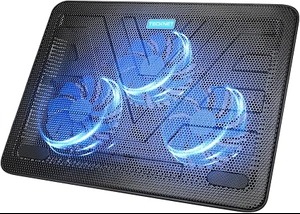
The TECKNET Laptop Cooling Pad is a simple, slim cooler that keeps the price low without dropping the basics. Like the Havit above, it uses three 110mm fans running at about 1200rpm, but it costs less, at around $23. If you want a forced-air laptop cooling pad without paying for extras, this is the one to look at.
It has a metal mesh top with rubber pads on the surface and on the base to keep your laptop from sliding. At 15 inches wide, 11 inches deep and 1.1 inches thick, it fits laptops from 12 to 17 inches, and two height settings let you tilt the keyboard to a comfortable angle. Power comes from your laptop’s USB port, so there is no adapter to carry, and a dedicated switch turns the fans on and off. A second USB port on the pad gives you a place to plug in a mouse or keyboard, and blue LEDs show when the fans are running.
There are a few trade-offs. The fans have an on/off switch but no speed control, so you can’t turn them down for quiet moments or up for longer sessions. The included cable is USB-A to USB-A, so your laptop needs a free USB-A port. Who is it for? Students, remote workers, and casual gamers who want a budget cooler that does its job without extras. If you want adjustable fan speed, the Thermaltake Massive V20 below is a better fit.
4. Kootek Laptop Cooling Pad – No compromises
Quick view on Amazon
Available in: Australia, Canada, UK and US
Quick Overview
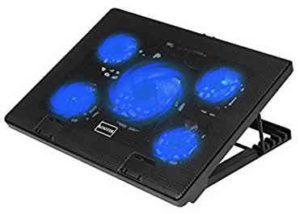
If the number of fans on a cooling pad were a race, the Kootek Cooling Pad would come in at first place. As you would have noticed, this cooling pad has 5 cooling fans! While it does not equate to better performance in real life, it sure is a cool gimmick and, in some cases, a useful feature, as we will elaborate in the upcoming paragraphs.
The design of the Kootek Cooling pad is simple, understated, and elegant. The single-tone black finish is something we highly appreciate in a cooler. In fact, we would go as far as saying this feels the sturdiest of all the other coolers because of its heft and thickness. Again, the metal mesh grille returns on this offering, which ensures maximum heat dissipation in what we call a ‘no-compromise’ package.
We won’t claim that it is the sleekest cooler at 1.38 inches or the lightest at 2.52 lbs, but we do know that it has some useful features hidden inside these compromises. For one, this cooling pad gives you the freedom of 6-way adjustments with two stoppers at the front to prevent your laptop from slipping. This arrangement ensures excellent ergonomics and prevents injuries or neck and back pain.
The airflow is excellent, and this cooler surely has tons of power to propel fresh air into your device. Four of the fans are smaller at 70mm and run at higher speeds of 2000rpm. The central big fan is 120 mm and runs at a speed of around 1000rpm. Surprisingly, the cooler is very quiet compared to our expectations because of the smaller fans running at high speeds. You can also independently shut off the big fans and small fans, which is a useful feature. However, the performance is humble compared to the tremendous horsepower of the Tree New Bee Cooling Pad.
So then, who is this cooler for? People who want a multi-faceted, no-compromise package and are willing to sacrifice portability and a little bit of performance over the flagship offerings. The Kootek Laptop cooling pad has been favored especially by owners of larger notebooks, such as those falling in the 17-inch screen category.
5. Thermaltake Massive V20 Steel Mesh Panel Single – Power
Quick view on Amazon
Available in: Australia, Canada, UK and US
Quick Overview
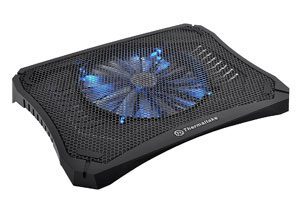
This one has excellent cooling performance and is made with high quality material along with 200mm led fan which allows big airflow and therefore good cooling effect. A great thing about it is that the fan speed is adjustable, which enables good cooling performance for your laptop. Interestingly, there’s also an LED light switch, using which you can adjust the lighting too.
It includes optimized metal mesh, which enables greater flow of air to create an efficient cooling effect on your laptop or notebook. Moreover, it is barely audible, which creates a peaceful working environment, and it also has efficient USB management and an extender.
6. KLIM Wind Laptop Cooling Pad – Performer
Quick view on Amazon
Available in: Australia, Canada, UK and US
Quick Overview
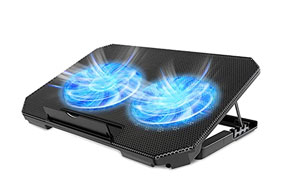
KLIM’s Wind laptop cooling pad is an excellent all-rounder, with no compromises. It’s a performer through and through. The ergonomic design of the laptop cooling pad not only makes it appear striking visually, but it also has room for 4 large fans, which provides solid cooling, through and through. The powerful four fans allow for great cooling and ventilation for your precious laptops. The best part about this laptop cooling pad is that it is multi-purpose, meaning that it provides cooling to laptops, as well as gaming consoles, making it more convenient to have.
Moving towards the highlight feature of this cooling pad is, of course, its cooling capabilities. The four fans deployed are able to run at 1200 revolutions per minute, while managing to remain quiet during operation, not exceeding 26 dB. The compatibility of the cooling pad is also diverse, ranging from 11 to 19 inches, leaving good room for options and customizations. The aesthetics of the device are also pleasing, with LED lights placed under each fan, for visual pleasance.
There are some added features for convenience, as well. Like the extra USB port, the symmetric wide-spaced design, to keep the biggest of laptops tucked in securely. Overall, this laptop cooling pad is optimally designed for laptops of all sizes, providing your laptop with instant cooling, and little noise.
These were our for the best laptop coolers and gaming laptop cooling pads in 2026 that we think are excellent at their job and don’t break the bank. Keep in mind that each customer has individual needs, and we respect that, so the products will rank differently for each customer.